
Autumn '25
In this release
AI-Powered Features
Generate Forms in Seconds with AI
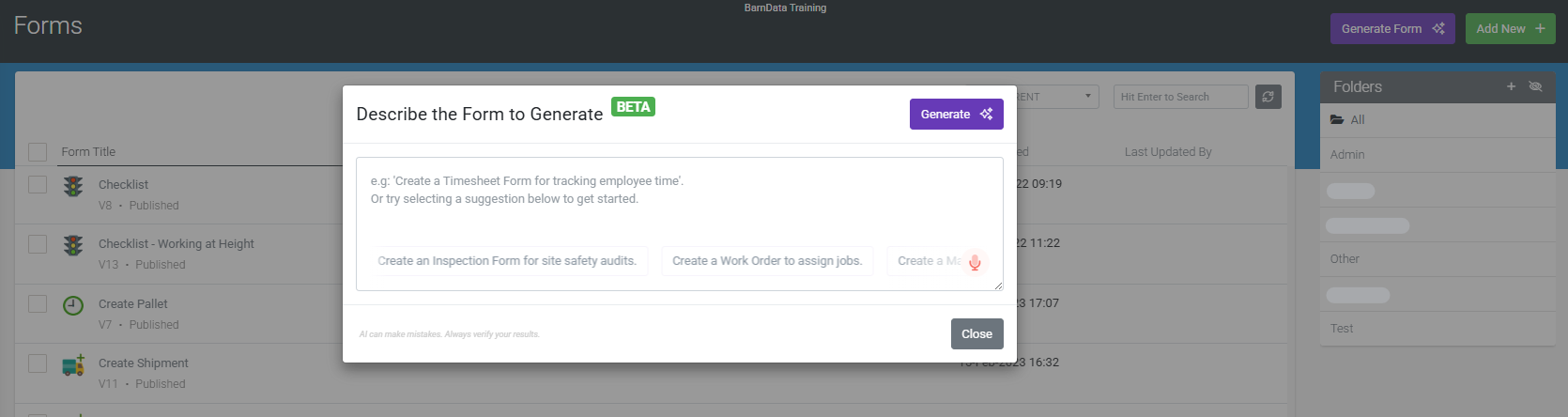
You’ll find a new ‘Generate Form’ button on the Forms page. Instead of starting with a blank canvas, you can simply describe the form you need using text or even your voice. Our AI will then interpret your requirements and build a robust starting point, complete with correctly configured fields. This dramatically reduces your initial setup time and delivers a working solution faster than ever before.
Your AI Assistant in the Form Designer
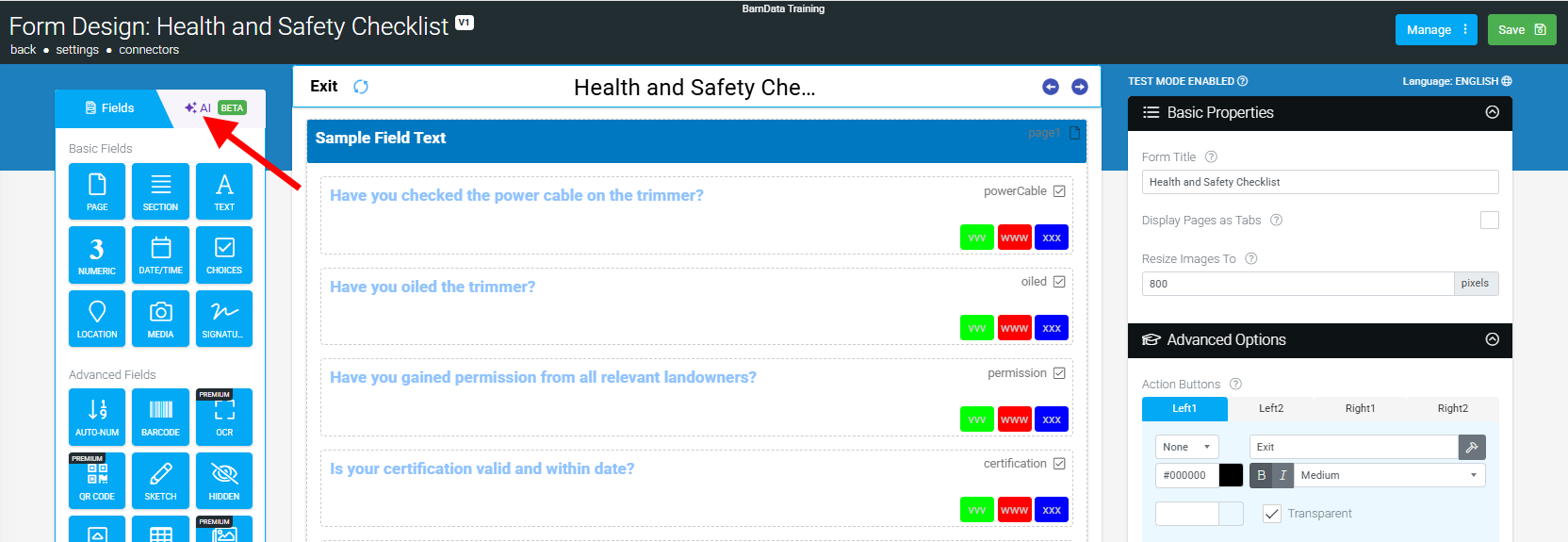
Building the initial form is just the beginning. The Conversational AI is also embedded directly into the Form Designer to act as your co-pilot.
Once your form is generated, you can continue the conversation. Ask the AI to modify your design, add new fields, apply visibility rules, or even get help writing a formula. Our goal is to make it feel like you have an FormsFly expert sitting right there with you, ready to help bring your vision to life. This interactive capability allows users of all skill levels to build dynamic solutions using simple, natural language.
A Quick Guide to Effective Prompts
Our AI is powerful, but it’s not a mind reader. The quality of your results depends on the quality of your prompts. Being clear and specific is key.
Good Prompt:
“Create a ‘Site Hazard Report’ form with fields for Supervisor Name, Date, and a Supervisor Signature. Add a Table Field called ‘Identified Hazards’. In the Table, include a Text field for ‘Hazard Description’, a Choices field for ‘Risk Level’ with options ‘High, Medium, Low’, and a required Photo field.”
Bad Prompt:
“Hey so I need a form for when the supervisors find problems on site. It’s for our safety records. I want them to be able to make a list of all the hazards they find, not just one. For each problem they add, they have to describe what it is and MUST take a picture. And it would be good if they could say how bad the problem is, like if it’s super dangerous or just a small thing. Basically, a way to add as many issues as they find during their walkaround. Oh, and at the end, the supervisor has to sign it, you know, to make it official.”
The good prompt is direct, specifies field types (like a Table Field), and clearly outlines the required information, leading to a much more accurate and useful result. For more tips, check out our Knowledgebase article.
| These new AI features will debut in Beta. While their potential is incredibly exciting, they are still learning and can occasionally produce incorrect or unexpected results. Your experience and feedback are critical to their evolution. Please dive in, experiment, and let us know how you go—your insights will be invaluable as the tools are refined and improved. |
Flow Layouts & Customisable Buttons
Two new features have been released recently, designed to give you more control over the look, feel, and efficiency of your applications. Building cleaner forms is now easier and keep your app fully on brand. These two features are currently rolling out and will be available in the coming days.
Flow Layout Field: Better Use of Space
The new Flow Layout Field helps you create great forms and better use the available screen space.
You can now place multiple fields side-by-side within a single container, creating layouts that feel more balanced and easier to scan. Especially for shorter input fields like names, numbers, or contact details.
The layout automatically adapts to the device in use:
Tablet: Up to 4 fields per row
Mobile: Up to 2 fields per row
It’s a simple but powerful way to make your forms look cleaner and more intentional.
Learn how to get the best results across all devices. Plus recommended guidelines and common pitfalls, in our knowledge base article.
Customisable Field Buttons: Make Your Brand Shine
Buttons are a key part of your users’ experience. And now, you have full control over how they look.
You can now customise the style of field-type buttons directly in your app setup, including:
- Custom Colours: Set primary, secondary, and tertiary colours for perfect brand alignment.
- Icons: Add icons to enhance clarity and visual appeal.
Start Exploring
Both features are rolling out and will soon be live and ready to use.
Log in today to improve layouts and give your app a cleaner, more intentional look.
There are still a few more surprises in store before the end of the year, so keep an eye out! 